Powder Charges and Gun Elevation in IRON NEST
How range, propellant charge and elevation form one consistent firing solution, plus a practical workflow for avoiding mismatched settings.
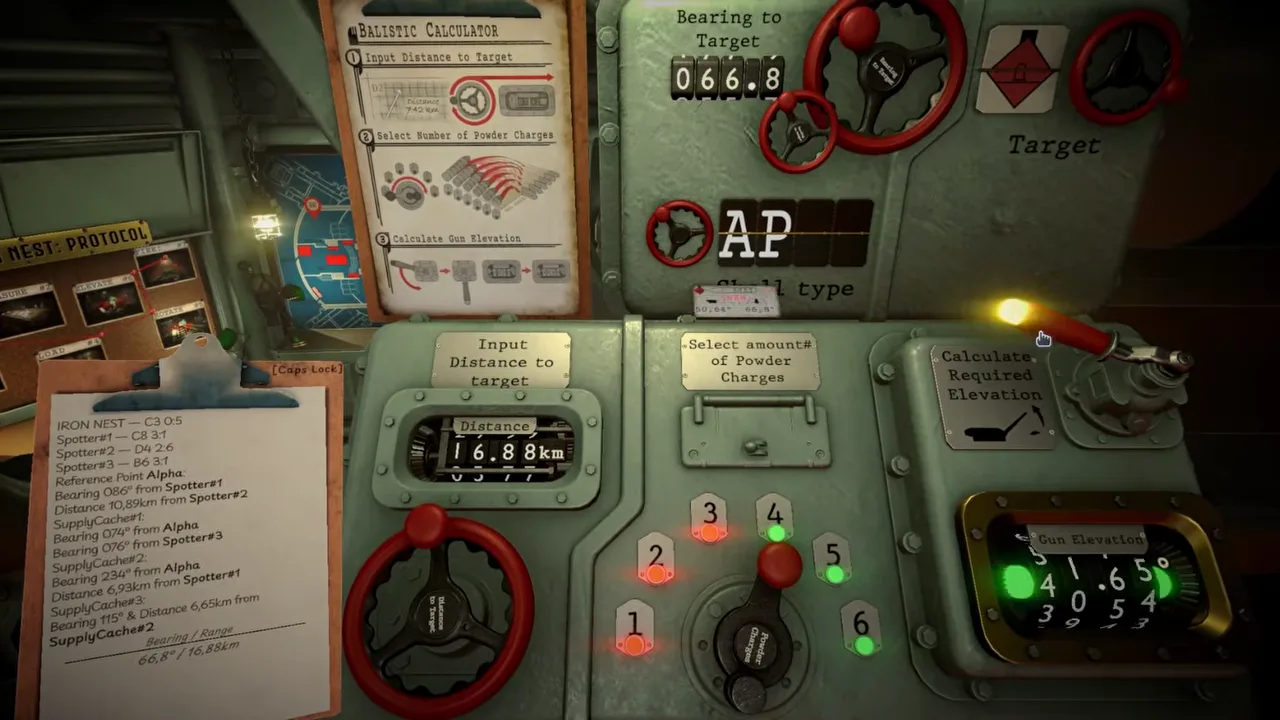
Powder charge and gun elevation are a pair in IRON NEST: Heavy Turret Simulator. Neither value describes a complete shot by itself. The charge affects how the projectile is launched; elevation defines the angle at which the gun is laid. The ballistic calculator connects both to the measured target range.
This relationship is stated directly on the official Steam page. Operators can drive charges higher to send shells across the horizon or reduce them for a more deliberate arc, but must match the exact propellant charge with the gun elevation. The warning is practical: a precise map plot cannot rescue a weapon configured for a different solution.
The most useful mental model is a labeled set: target, range, charge, elevation. Keep those four items together from the calculator to the gun. If one changes, recheck everything downstream.
What the powder-charge selector does
The calculator footage above shows six numbered charge positions. The operator enters target distance, selects an amount of powder charges and operates a lever to calculate the required elevation. The illuminated readout then provides a result to transfer to the gun-laying station.
The visible interface confirms the workflow, but it does not publish the internal ballistic table. This wiki therefore does not invent muzzle velocities, charge masses or exact range bands. The safe claim is functional: the selected number of charges is an input, and changing that input can change the elevation required for the same range.
“More” should not be confused with “more accurate.” A higher charge may support a longer reach or a different trajectory, but it also creates a different solution. Accuracy comes from consistency among inputs and physical settings, not from maximizing one control.
Why elevation changes with charge
As real-world background, a projectile leaves the barrel with velocity and then follows a curved path under gravity and aerodynamic forces. More propellant can change launch velocity. Changing launch angle changes how the projectile’s motion is divided between upward travel and travel toward the target. Distance therefore depends on the relationship between velocity and angle.
That background explains why IRON NEST asks for both charge and range before returning elevation. It should not be mistaken for a claim that the game simulates every real atmospheric variable. The official May Q&A described shell weight and wind as ideas under consideration at that time, not confirmed final inputs. The released interface is the authority on what a specific mission actually models.
For play, no derivation is required. The calculator operationalizes the relationship. Your job is to supply the correct range, choose the intended charge, read the resulting elevation and make the enormous machine match it.
A reliable charge-and-elevation workflow
First, finish the map work. Locate the target and measure from the turret’s current position. Do not feed an observer-to-target range into the gun calculation. Label the final number with the target identifier, especially when several objectives are active.
Second, enter that distance carefully. The frame above shows a multi-digit kilometer display, making transposition and decimal errors possible. Compare the calculator with the written range one digit at a time.
Third, select the charge for the intended shot. If the mission, protocol card or reference material specifies a charge, follow it. Otherwise use the in-game tools rather than assuming that the maximum position is desirable.
Fourth, operate the calculation control and record the elevation beside the charge. A useful note is “Target 7 — charge 4 — elevation 40.65,” not a bare angle that may later be attached to the wrong target.
Fifth, ensure the loading state matches the selected charge, then lay the gun to the returned elevation. Conduct a final comparison before firing.
The mismatch errors that matter most
The simplest failure occurs when the operator calculates with one charge and loads another. Every control may look properly used, yet the solution no longer describes the shot. Correct the loading state or recalculate; do not compensate by guessing at the elevation wheel.
A second error happens after a late decision. Perhaps a different trajectory seems preferable, so the charge is changed at the calculator. The old elevation remains on the gun. Because the charge–elevation pair has been separated, the new shot is not the solution just calculated.
A third error is stale data. An operator solves Target Alpha, then receives Target Bravo and updates only the range. If the chosen charge or written elevation belongs to Alpha, the instruments now display a hybrid that never represented a real firing plan.
The cure is not more arithmetic. It is data discipline. Treat each solution as a versioned package and strike through obsolete values when anything changes.
Choosing a trajectory without inventing rules
The Steam description contrasts driving charges higher with dialing them back to arc shells deliberately into emplacements. That language establishes that trajectory shape can be tactically meaningful. It does not establish a universal rule such as “low charge is always high arc” for every target and shell.
Terrain, target protection, available charge settings and the calculator’s allowed solutions can all constrain a shot. Follow mission instructions and the instrument. If multiple valid combinations appear in version 1.0, compare their operational purpose rather than ranking them only by number.
The same caution applies to ammunition. Shell type determines the intended effect; charge and elevation determine how the chosen shell is delivered. Do not substitute one layer for another. A trajectory suited to the location is still useless if the shell cannot produce the required effect there.
What to do when the calculator is unavailable
In the pre-release Q&A, the developer discussed at least one planned situation in which the ballistic calculator would be unavailable or broken. He described a reference sheet covering broad relationships among ranges, charges and elevations. Because that answer predates version 1.0, the exact mission placement should be verified in the released game.
The design lesson is clear. The calculator is a convenient implementation of a relationship the operator should understand. A table can bracket the required range, while judgment or interpolation narrows the setting. Even then, the charge–elevation pair remains inseparable.
Players using a manual aid should write more, not less. Record the two reference rows, the measured range, the chosen charge and the estimated elevation. That trail makes a correction possible after the first observed impact.
Diagnosing short and long shots
If a shell travels along the correct bearing but lands short or long, inspect this group in order: target range, calculator distance, selected charge, actual loaded charge, returned elevation and physical gun elevation. The visible direction of error may suggest a vertical-solution problem, but it does not tell you which link failed.
Change only the earliest wrong value. A mistyped range requires recalculation. A correct calculation paired with the wrong physical charge may require only a loading correction. A correctly loaded gun with a misread elevation needs the laying control fixed. Altering several values together can produce a hit while hiding the fault.
Remember that a displaced target marker can also look like bad ballistics. Confirm the map solution before concluding that the charge table is wrong.
The operator’s final callout
Immediately before firing, read the chain aloud or on paper:
- Correct target and turret-relative range.
- Intended shell for the objective.
- Charge selected in the calculator.
- Same charge prepared at the gun.
- Elevation returned for that exact combination.
- Same elevation displayed on the intended gun.
IRON NEST makes these checks interesting because values must travel through physical stations. The calculator does not remotely configure the weapon. The operator is the connection—and the shot is only as reliable as that connection.
Frequently asked questions
Does a higher powder charge always mean a better shot?
No. A charge is one input to a firing solution, not a quality setting. The selected charge must be paired with the elevation calculated for the target range and the mission's intended trajectory.
Why did my shot miss after I changed the charge?
Changing propellant changes the solution. Recalculate elevation after changing the number of charges, then verify that the physical loading state and gun setting match the new pair.
Can two charge settings reach the same target?
General projectile physics allows different trajectory shapes to reach some ranges, but this page does not claim that every theoretical pair is available or useful in IRON NEST. Follow the in-game calculator and mission constraints.