IRON NEST Ballistic Calculator Guide
A version-aware guide to entering target distance, choosing powder charges, reading elevation and transferring a complete firing solution to the guns.
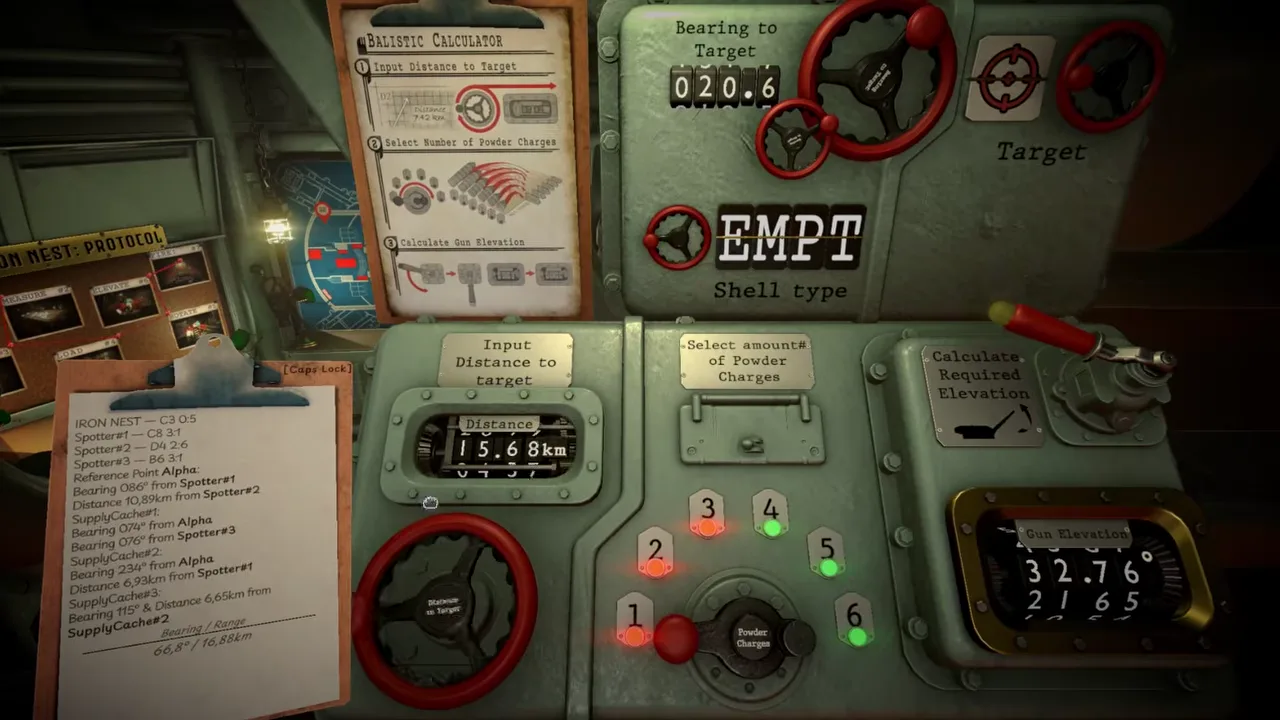
The ballistic calculator in IRON NEST: Heavy Turret Simulator converts a mapped firing problem into a gun-laying instruction. It does not locate the target, choose the objective or physically configure the weapon. The operator must bring it a correct turret-to-target range, select the intended powder charge, read the returned elevation and preserve the relationship among those values all the way to the gun.
That boundary is the key to using the instrument well. A calculator can return a correct answer for incorrect inputs. A correct answer can also become useless if the operator loads a different charge or copies the elevation to the wrong control. Think of the device as one station in an auditable chain, not a button that solves the entire shot.
Official developer footage gives a clear view of the interface. The frame above shows target bearing, a shell-type field, distance input, six charge positions, a calculation lever and an illuminated gun-elevation result. The exact values are an example from the video, not a universal solution to copy.
What the calculator officially does
The current Steam description tells players to work the ballistic calculator toward firing solutions, drive charges higher for long reach or dial them back for a deliberate arc, and match gun elevation with the exact propellant charge. In the May 2026 Q&A, the developer described range and powder charge as the inputs used to obtain elevation.
Together, those sources establish the core relation:
measured target distance + selected powder charge → required gun elevation
The console displays other contextual fields, including bearing, target identity and shell type. Those help keep a solution attached to the correct objective. They should not be interpreted as proof that every displayed label modifies the internal trajectory calculation in the same way.
Step 1: finish the map solution first
Do not begin at the calculator. Intelligence may give coordinates, observer positions, bearings or distances that identify a target. Plot those relationships on the tactical map, mark the target, then measure from the IRON NEST’s current position to that point.
The distinction between reconnaissance range and firing range is essential. A spotter-to-target distance helps locate the target. The calculator needs the turret-to-target distance. Entering the former can produce a perfectly consistent elevation for the wrong origin.
Record bearing and range together with a target identifier. If the turret has moved, discard measurements from its old position and repeat the map-to-target line.
Step 2: enter target distance carefully
The visible distance control uses several digits and a decimal. Compare the console with the written map value one character at a time. Errors such as 15.68 becoming 16.58 can survive a quick glance because both appear plausible.
Keep units consistent with the in-game report and display. This guide does not publish a conversion table because the released interface should be followed directly. If a mission gives information in a different form, resolve it on the map before entering the calculator.
After setting distance, read it back as part of the target label: “Target Alpha, turret range 15.68,” rather than treating the number as an isolated fact.
Step 3: select a powder charge
The official video shows six numbered positions. The chosen amount is not an accuracy or difficulty slider; it is part of the trajectory solution. Higher is not automatically better, and a setting used for one target should not be carried to another without checking.
Follow any protocol, mission instruction or in-game reference that constrains the choice. The Steam description establishes that different charge levels can support different reach or arc behavior, but it does not publish every range band or declare one best setting for all ammunition.
Write the selected charge beside target and distance before calculating. That note will later prove whether the physical loading state matches the instrument.
Step 4: operate the calculation control
Once distance and charge are correct, use the lever labeled to calculate required elevation. Let the output settle, then copy the result with enough precision to reproduce the display at the gun.
Do not round merely because a shorter number is easier to remember. If the interface shows decimal precision, preserve it unless the gun control or an official instruction requires a different form. We do not know the internal tolerance from the store description alone.
The result belongs to the current input pair. If distance or charge changes, the old elevation should be crossed out and the calculator operated again.
Step 5: transfer the solution to the guns
The calculator does not remotely lay the weapon. Move to the appropriate station and set bearing and elevation on the physical controls. Verify whether left and right guns hold separate values, and apply the result to the intended gun rather than whichever display is closest.
Then verify the actual powder charge at the loading stage. This is the most dangerous handoff because the calculator can be correct while the machine is configured for another solution. The shell follows the physical charge and barrel angle, not the operator’s notes.
A useful pre-fire callout is: target, bearing, range, shell, charge, elevation, gun. Each word should point to a visible value or state.
The shell-type field
Official footage shows a shell-type area on the calculator panel. The released Steam description also makes ammunition purpose central: armor-piercing and smoke rounds, for example, solve different battlefield problems.
The May Q&A said shell weight was being considered as a potential calculation factor at that time. It did not confirm a finished weight model. This guide therefore does not claim that swapping every shell automatically applies a documented hidden ballistic coefficient.
Treat the field as necessary solution context. If ammunition changes, verify the calculator, protocol and gun state rather than assuming the old elevation remains valid. Mission evidence and the released interface take priority over real-world expectations.
Bearing is related but separate
The console displays bearing to target, but elevation calculation and horizontal gun laying answer different questions. Bearing tells the turret where to face. Range, charge and elevation determine the trajectory along that direction.
If a shot lands at roughly the correct distance but to one side, revisit map plotting, bearing and traverse transfer before changing the charge. If it travels along the intended direction but consistently falls short or long, inspect range, charge and elevation. These are diagnostic patterns, not infallible rules.
The calculator should help keep both axes attached to the same target, not encourage the operator to correct one with the controls for the other.
What the instrument does not prove
Real exterior ballistics can include projectile mass, drag, air density, wind, temperature and other effects. The cited official sources do not establish that version 1.0 simulates every one of them. During the Q&A, wind and shell-weight ideas were explicitly still under consideration.
Do not enter unofficial correction values or copy a real artillery table unless a released mission asks for it. Our browser ballistic calculator tool demonstrates idealized projectile relationships; it is not a reverse-engineered copy of IRON NEST’s internal table.
This evidence boundary keeps the guide useful after patches. Observed controls can be updated when the game changes without pretending an inferred physical model was ever confirmed.
Manual fallback and reference sheets
The pre-release Q&A discussed a planned situation in which the calculator would be unavailable or broken. The developer described using a reference sheet with broad range, charge and elevation values. The exact version 1.0 mission should be checked before treating that placement as confirmed.
The concept reveals why understanding inputs matters. A table can bracket a range and help estimate an elevation, but the operator still has to keep the selected charge paired with the estimate. Manual fallback is not random trial and error; it is a less automated version of the same relationship.
Common failure patterns
If the result is wrong, audit the chain in order:
- Was the correct target plotted from the correct source information?
- Was range measured from the turret, not an observer?
- Does calculator distance match the written map value?
- Is the selected charge the one physically prepared?
- Was the returned elevation copied without transposition?
- Are bearing and elevation set on the intended gun?
- Is the intended shell loaded and the mechanism ready?
Fix the first demonstrably wrong step, then recompute everything downstream. The full miss troubleshooting guide explains how to classify impact evidence.
The dependable calculator habit
Every use should produce one labeled package: target — range — bearing — shell — charge — elevation — gun. Cross it out when any input changes. Preserve the machine state until impact evidence arrives.
That discipline makes the calculator less intimidating because it narrows its job. The instrument is not the brain of the entire turret; it is a precise translator between map distance, propellant choice and gun angle. The operator remains responsible for giving it the right problem and making the rest of IRON NEST obey the answer.
Frequently asked questions
What does the IRON NEST ballistic calculator need?
The documented workflow uses the turret-to-target distance and selected number of powder charges to produce the required gun elevation. The visible console also tracks bearing, target and shell-related information.
Does the calculator automatically aim the guns?
No. The operator must transfer the calculated solution to the physical gun-laying controls and ensure the loaded charge matches the one used in the calculation.
Does shell weight or wind change the calculation?
In the May 2026 pre-release Q&A, the developer said shell weight and wind were being considered, not that they were finished inputs. Follow the released interface rather than assuming every real-world ballistic variable is simulated.