The IRON NEST Post-Release Verification Checklist
A practical checklist for verifying current IRON NEST availability, platform features, demo scope, controls and source claims after the August 2026 full release.
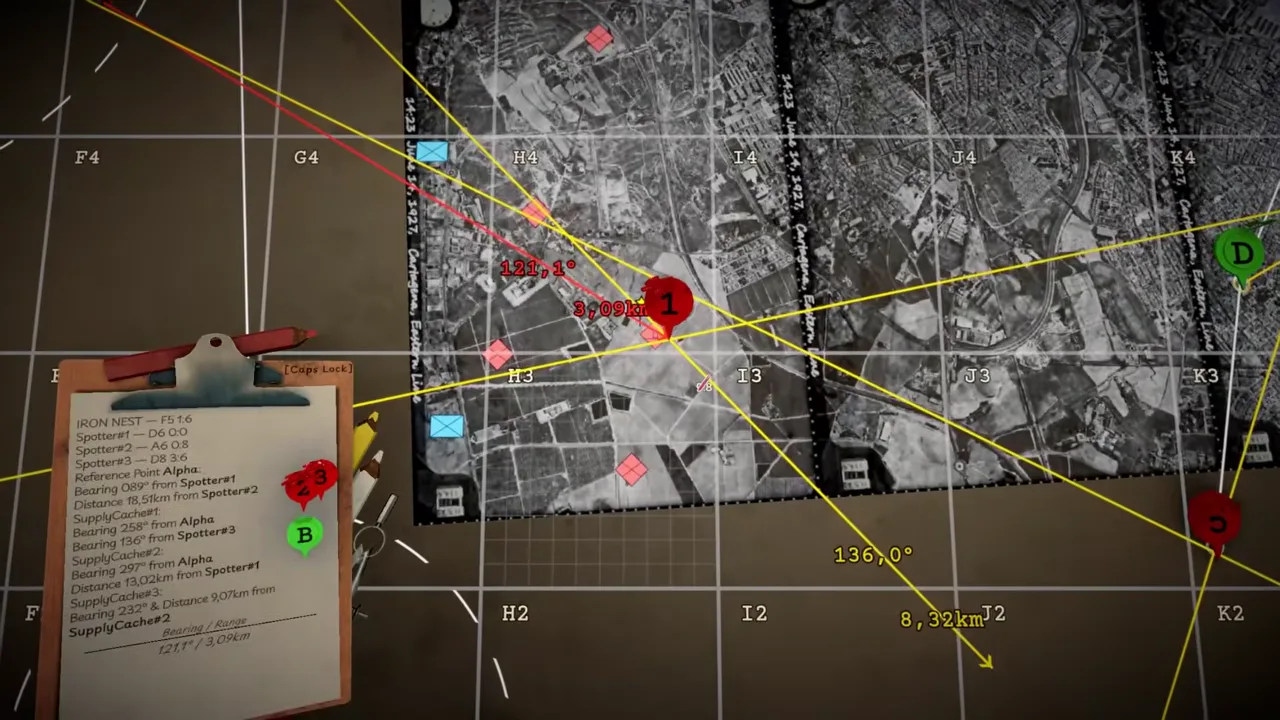
IRON NEST released in full on August 6, 2026, and its current Steam product page is the best public starting point for checking what the released game advertises. The same ecosystem also contains a separate demo listing, launch and developer videos, older interviews and community discussion. Those sources are useful, but they are not interchangeable. A post-release verification checklist helps a player answer one question at a time with the source most able to answer it.
Use this checklist whenever you are about to repeat a claim about availability, platform support, manual controls, demo scope, language support, progression or a specific observed behavior. Its purpose is not to make you distrust every source. It is to stop a historical statement, a trailer frame or a one-session observation from quietly becoming a current guarantee.
Verify release status on the full product page
Open the current full Steam listing first. It identifies IRON NEST: Heavy Turret Simulator as released on August 6, 2026. This page is the primary public source for the product’s current storefront status, its published developer/publisher presentation and its broad feature description. If an article still calls the game unreleased, describes only an August window or treats a launch trailer as future tense, the current listing is stronger evidence.
Record the date you checked the page when the wording matters. Store pages can change with patches, new languages, feature updates or promotional periods. A dated note such as “current listing checked on [date]” is more durable than pretending the storefront never changes.
Do not use current prices, review totals or temporary discounts as permanent facts unless you are specifically checking them at the time and labeling them. They change often and are rarely necessary for a content guide about the game’s systems.
Verify the game premise separately from individual details
The full listing confirms the high-level manual loop: the player is the Operator of a massive heavy turret, receives High Command and frontline reports through teleprinters, works an interactive map and ballistic calculator, chooses ammunition, sets charges and elevation, turns the turret and gets aerial photographs after a strike. It also establishes an alternate-history late-1920s Spanish setting with a monarchy still in power and a republican uprising.
Use these statements for an overview. Do not stretch them into a complete control manual, a complete ammunition table, a published damage model or a full narrative outline. The page advertises a combined thirty ammunition types and abilities, 15 regions, over 100 medals, two challenge modes with leaderboards, a handcrafted story and procedural objectives. It does not list every unlock, named region, objective generator or shell interaction.
The verification rule is simple: quote the level of detail the source gives. A count supports a count. A label supports a label. A broad description supports broad explanation. More precise claims need current in-game text or a directly supporting official source.
Verify the demo as a separate product
IRON NEST has a separate demo Steam listing. It is useful for checking whether a demo is currently available and for testing your own machine, control preferences, display readability and interest in the central operator loop. It is not a complete substitute for the released full-product listing.
When testing in the demo, label the result: demo build, platform, date, settings and what you actually observed. “This demo session displayed this prompt” is strong and repeatable. “The full game has no feature I did not see in the demo” is not. The full listing advertises a broader story, objective, region and progression context than a short trial necessarily shows.
Likewise, do not assume a demo observation survives unchanged after a full-game patch. Test the current installed version when the precise behavior matters.
Verify platform labels in their own domain
The full listing currently displays Steam achievements, Steam Cloud and Family Sharing among platform features, and it shows 33 Steam achievements. It separately advertises more than 100 unlockable medals inside the game. Check which layer a claim belongs to. A Steam achievement is a platform achievement; an in-game medal is a game progression item. Their names, triggers and update timing should not be merged without evidence.
Steam Cloud being listed supports the claim that cloud support is advertised. It does not promise a particular recovery result for every sync conflict or local save issue. If you are verifying a save problem, record the actual current messages and state before deleting, reinstalling or forcing a cloud action.
Language tables are likewise availability evidence. They identify advertised interface, audio or subtitle support. They do not prove that every important prompt is easy to read on your display or controller setup. Test the critical screens that matter to you.
Verify a gameplay claim in the current build
For questions about a control, mission state, shell behavior or map interaction, use the current build. Create a small controlled test. Record the active objective, report source, target mark, selected configuration and visible outcome. Change one relevant variable in a second attempt when possible. This is more reliable than relying on a sentence from an old article or a remembered video.
The official listing’s manual structure helps organize the test: report, map, calculation, configuration, shot, aerial evidence. If something goes wrong, identify the earliest state that may have changed. Do not immediately claim that the calculator, a shell or an objective is broken when target placement, a stale input or an uncompleted interaction may be responsible.
Use screenshots or short clips when they show the relevant state, but remove personal information. A concise written reproduction is often sufficient.
Verify video evidence by timecode
Official YouTube videos are valuable for visual context and direct statements. A video can show a particular control room, task card or message presentation. Cite the exact timecode and describe exactly what the frame or narration supports. A video frame can establish that an element appeared in official footage; it does not necessarily prove every unseen rule around it.
This is why the wiki’s images retain video URL, title, channel, timestamp and capture date. The image is an attributed official frame, while current product and in-game sources carry the more specific product claim. Keeping that division clear prevents an attractive trailer shot from becoming a fictional mechanic description.
Verify historical material as history
Pre-release Q&As, interviews and early articles can be excellent records of development intent. They should be read in their original tense. A pre-release statement that the developer hoped to structure missions a certain way is not automatically a release-version specification. When comparing it with the full game, identify the date and use current storefront or in-game material for the present state.
If sources differ, do not conceal the difference. State that an earlier source described one plan and that the current release listing confirms another level of detail. This gives readers an accurate timeline without turning normal development changes into a false contradiction.
A compact release verification card
For any claim, fill in six fields: question; current primary source; access date; what the source explicitly supports; what it does not support; next verification step. For example: “Is the full game released? Full Steam listing; checked today; supports August 6, 2026 full release; does not establish every patch change; check current build for behavior.” The card keeps a source-aware answer short and clear.
For a demo question, use the demo listing. For a visible artwork or control question, add an official video timecode. For a runtime behavior question, add a current build observation. For historical context, label the old source as dated.
The dependable conclusion
Post-release verification is not about finding a single page that answers every question. It is about matching the question to the source. The full Steam page is the public baseline for release status and broad advertised features. The demo is a separate, bounded test environment. Official videos support what they show and say at a timecode. The current build is strongest for current interactions. Older interviews explain history rather than replacing release evidence.
Following this checklist keeps IRON NEST information useful after launch, when the difference between “once discussed,” “shown in a demo” and “currently confirmed” matters most.
Frequently asked questions
What should I verify first after release?
Check the current full Steam listing for release status and advertised features, then use the demo or installed build to test the specific control, performance or readability question that matters to you.
Why not rely on an old article or trailer?
They can provide historical context, but current store text and the current build are stronger evidence for availability, feature labels and present behavior.